Monday, 7 May 2018

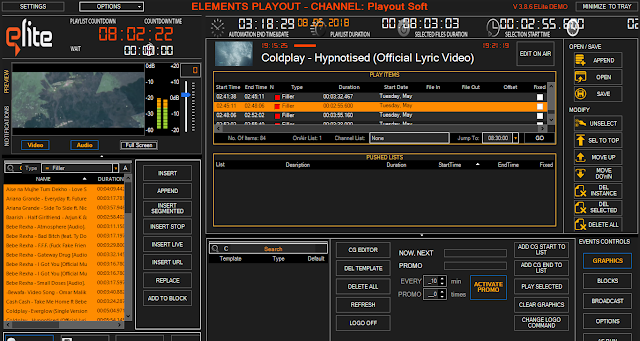
Elite Playout Ver.3.8.6

OUR "ELite" IS SMART

  • EASY INSTALLATION

    Installation is done in just a few steps. There is no any SQL prerequisities. Our DB is now integrated.
  • INSTANT LICENSING

    The application is licensed only a few seconds after the purchase! Also, at any time, you can return the license to the activation server in the case of replacing the computer or operating system.
  • SIMPLE MEDIA ASSET MANAGAMENT

    As part of the program, you can use the integrated database. Entered metadata will be used for automated processes.
  • MULTI FORMAT PLAYBACK

    Multiple Format Capability. Play your content instantly without unnecessary conversions.
    • MXF
    • MP4
    • MPG
    • GXF
    • AVI
    • MOV
    • DNXHD
    • PRORES
  • CHOOSE YOUR OUTPUT!

    Our “ELite” will suit your needs. Just choose your destination:
    • SDI 4K/2K/HD/SD output using BlackMagic Decklink or Intensity cards
    • UDP Multicast/Unicast H.264 streaming (nVidia or Intel QuickSync required)
    • Newtek NDI IP output (send your video output to vMix or TriCaster using Gigabit network)
    • Direct Show OUT
  • CHOOSE YOUR INPUTS!

    Except for video files, playlist support “live” sources:
    • SDI using Decklink or Intensity
    • Stream sources (UDP, RTMP or even Youtube video clips)
  • ADVANCE PLAYLIST AUTOMATION

    Using our included “Scheduling” tool, you can schedule broadcast weeks in advance. Just create a Playlist, select the start time and press the magic button “PUSH TO PLAYOUT”. Playout will analyze all sent playlist and start each according schedule.
  • AUTOMATION HELPERS

    What if something goes wrong? No worries! “ELite” has everything you need to have.
    • Default “LOOP” list
    • Fixed time events and gap calculations
    • “Gap” fillers
    • “Missing file” filler
  • BROADCAST GRAPHICS

    Modern television does not exist without the rich graphics. Therefore, “ELite” is able to meet the needs.
    • Animated PNG sequences playout (looped, one time…)
    • Multiple crawls and rowls with custom separators (typed manually or linked to text file)
    • SWF Flash playback
    • Pictures
    • Logo insertion
  • CG BRANDING

    Help your audience! Turn your schedule to graphics:
    • Watching now
    • Watching next
    • Later
  • AS RUN LOGS

    The actual accurate record of programming and commercial schedules for each viewing network or entity.
    • Export to XML
    • Export to Excel


How To Add or Change Default Search Engine in Google Chrome

Search engine most of the internet user heard the name and also use it. When we need a content. So, To find the content easily, we usually search it on a search engine.

There are a lot of search engine like google, yahoo, bing etc. So, today I will show you how to change the default search engine of Google Chrome browser.

Step-1: Open your google chrome browser.

Step-2: Click on the three-dot in the top right corner and click "Settings"

Step-3: Scroll down and click "Manage Search Engines" under the search engine menu.

Step-4: There you will see many search engine. You can change the default search engine from here or you can add any other by clicking "Add"

Step-5: If you click on "Add" there a pop up menu will appear. You need to fill the form carefully. After that click on "Add"

Step-6: Now you will see your new search engine. To make it default click on "Three-dot" besides the new engine. Then click on "Make it default"

If you face any problem you can watch the video


Parrot Security OS 4.0 Beta release

Read more: Parrot Security OS 3.11 Release
Parrot Security OS 4.0 Beta release
What's the Parrot Security OS?
Parrot Security OS (or ParrotSec) is a Linux distribution based on Debian with a focus on computer security. It is designed for penetration testing, vulnerability assessment and mitigation, computer forensics and anonymous web browsing. It is developed by the Frozenbox Team.

Do you want to be a beta tester of Parrot Security OS 4.0?
   Download the latest testing releases from here
   Try them and send your full report to team@parrotsec.org or paste it as a comment below
   Join the Parrot Community for more information


PSCrypt ransomware: back in business


PSCrypt is ransomware first discovered last year, in 2017, targeting users and organisations alike in Ukraine, and the malware itself is based on GlobeImposter ("GI") ransomware.

I've written about PSCrypt in the past, when it was distributed via Crystal Finance Millenium's hacked website: Crystal Finance Millennium used to spread malware

In this quick blog post, we'll take a look at the latest iteration of PSCrypt.


Analysis

A file named "xls.scr", which sports a fancy "energy" or "power" icon is responsible for loading PSCrypt on the machine, and was spread via a phishing campaign.

Figure 1 - Icon

The ransomware has the following properties:


As mentioned earlier, PSCrypt is based on GlobeImposter and as such, has very similar functionality.

The following folders are excluded from being encrypted:

Avast, Avira, COMODO, Chrome, Common Files, Dr.Web, ESET, Internet Explorer, Kaspersky Lab, McAfee, Microsoft, Microsoft Help, Microsoft Shared, Microsoft.NET, Movie Maker, Mozilla Firefox, NVIDIA Corporation, Opera, Outlook Express, ProgramData, Symantec, Symantec_Client_Security, Windows, Windows App Certification Kit, Windows Defender, Windows Kits, Windows Mail, Windows Media Player, Windows Multimedia Platform, Windows NT, Windows Phone Kits, Windows Phone Silverlight Kits, Windows Photo Viewer, Windows Portable Devices, Windows Sidebar, WindowsPowerShell, Wsus, YandexBrowser, ntldr, spytech software, sysconfig, system volume information

This iteration of PSCrypt will encrypt all files, including executables, except those files with the following extensions:

.$er,.4db,.4dd,.4d,.4mp,.abs,.abx,.accdb,.accdc

As usual, a temporary batch file will be used to clear Volume Shadow Copies as well as Event Logs:

Figure 2 - Batch file

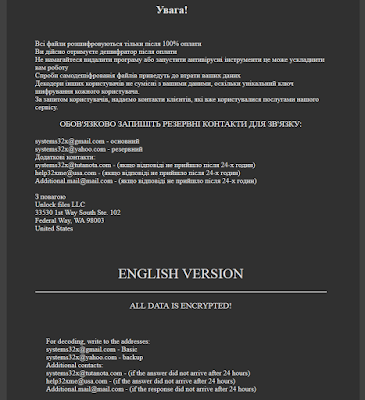
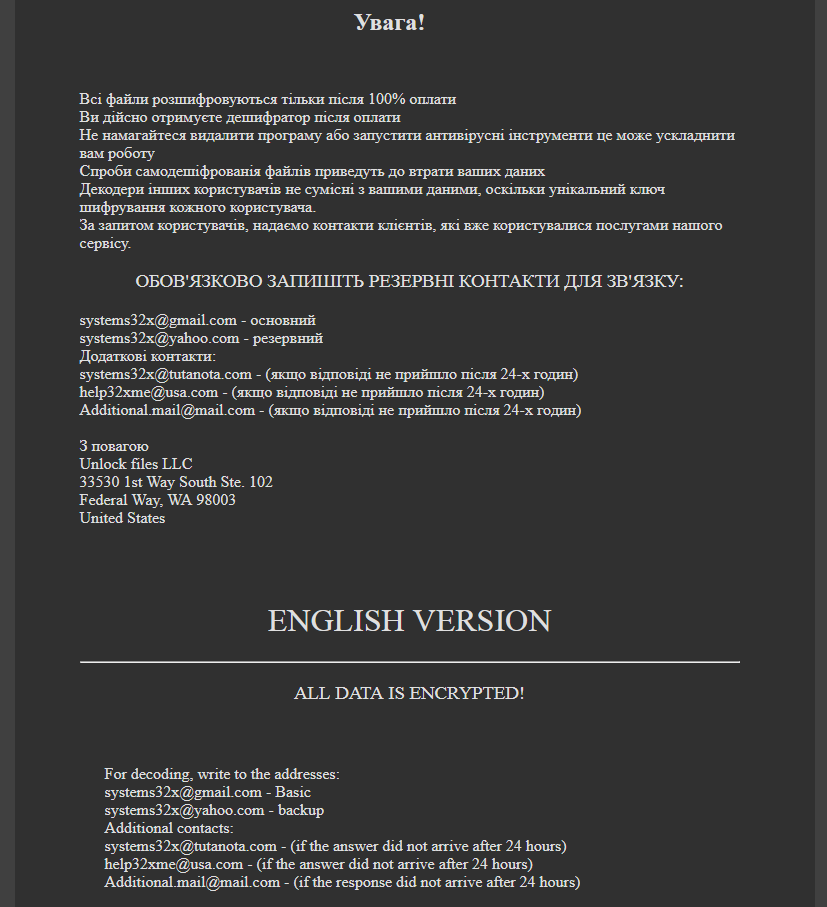
What's new in this iteration of PSCrypt is not only the changes implemented by/via GlobeImposter ransomware, but also the ransom note itself, as noted in Figure 3 and 4 below:

Figure 3 - Ransomware note, part 1

Figure 4 - Ransomware note, part 2

The title of the ransom note is "Ваші файли тимчасово зашифрувати! Не хвилюйтесь!", which translates to "Your files are temporarily encrypted! Do not worry!".


The Ukrainian version is rather lenghty, and is as follows:

☠ ВАШІ ФАЙЛИ ТИМЧАСОВО НЕДОСТУПНІ.☠
ВАШІ ДАНІ БУЛИ ЗАШІВРОВАННИ!
Для відновлення даних потрібно дешифратор.
Щоб отримати дешифратор, ви повинні, оплатити послуги розшифровки:
Оплата відбувається за коштами біткойн на кошелек № 1EoWxYTt7xCskTxjm47E2XNxgkZv1anDP9
Вартість послуги складає 150$
Оплату можна провести в терміналі IBox. або виберіть один з обмінних сайтів на сторінці - https://www.bestchange.ru/privat24-uah-to-bitcoin.html (приклад обмін Приват24 на BTC) також можете скористатися послугами https://e-btc.com.ua
Додаткова інформація:
Програма можемо дешифрувати один файл як доказ того, що у неї є декодер. Для цього необхідно надіслати зашифрований файл - вагою не більше 2 mb, и ваш уникальный идентификационный код, на пошту: systems32x@gmail.com
Более детальная инструкция по оплате: https://btcu.biz/main/how_to/buy
Увага!
Всі файли розшифровуються тільки після 100% оплати
Ви дійсно отримуєте дешифратор після оплати
Не намагайтеся видалити програму або запустити антивірусні інструменти це може ускладнити вам роботу
Спроби самодешіфрованія файлів приведуть до втрати ваших даних
Декодери інших користувачів не сумісні з вашими даними, оскільки унікальний ключ шифрування кожного користувача.
За запитом користувачів, надаємо контакти клієнтів, які вже користувалися послугами нашого сервісу.
ОБОВ'ЯЗКОВО ЗАПИШІТЬ РЕЗЕРВНІ КОНТАКТИ ДЛЯ ЗВ'ЯЗКУ:
systems32x@gmail.com - основний
systems32x@yahoo.com - резервний
Додаткові контакти:
systems32x@tutanota.com - (якщо відповіді не прийшло після 24-х годин)
help32xme@usa.com - (якщо відповіді не прийшло після 24-х годин)
Additional.mail@mail.com - (якщо відповіді не прийшло після 24-х годин)
З повагою
Unlock files LLC
33530 1st Way South Ste. 102
Federal Way, WA 98003
United States

Google Translation, so pretty loose - I've made some minor corrections however:

☠ YOUR FILES ARE TEMPORARILY UNAVAILABLE
YOUR DATA WAS LOCKED!
To restore data you need a decoder.
To receive a decoder, you must pay for decoding services:
Payment is made at the expense of bitcoin to wallet number 1EoWxYTt7xCskTxjm47E2XNxgkZv1anDP9
Service cost is $ 150
Payment can be made at the terminal IBox. or select one of the exchange sites on the page - https://www.bestchange.ru/privat24-uah-to-bitcoin.html (example exchange of Privat24 to the BTC), you can also use the services of https://e-btc.com.ua.
Additional Information:
The program can decrypt one file as proof that it has a decoder. To do this, you need to send an encrypted file weighing no more than 2 mb and your unique identification code by mail: systems32x@gmail.com
More detailed payment instructions: https://btcu.biz/main/how_to/buy
WARNING!
All files are decrypted only after 100% payment
You really get a decoder after payment
Do not try to uninstall a program or run antivirus tools, which can complicate your work
Attempts to self-decrypt files will result in the loss of your data
Other users' decoders are not compatible with your data, as the unique encryption key for each user.
At the request of users, we provide contact with customers who have already used the services of our service.
MUST REQUEST BACK TO CONTACTS FOR CONNECTION:
systems32x@gmail.com - basic
systems32x@yahoo.com - backup
Additional contacts:
systems32x@tutanota.com - (if the answer did not arrive after 24 hours)
help32xme@usa.com - (if the answer did not arrive after 24 hours)
Additional.mail@mail.com - (if the answer did not arrive after 24 hours)

The English version is rather short and to the point:

ALL DATA IS ENCRYPTED!
For decoding, write to the addresses:systems32x@gmail.com - Basic systems32x@yahoo.com - backup Additional contacts: systems32x@tutanota.com - (if the answer did not arrive after 24 hours) help32xme@usa.com - (if the answer did not arrive after 24 hours) Additional.mail@mail.com - (if the response did not arrive after 24 hours) 

The cost for restoring service is, interestingly enough, expressed in US dollars this time ($150), as opposed to Ukrainian currency in a previous iteration.

However, the images which included IBox instructions (as payment method) have been removed, and while IBox is still suggested as a service, there's also a new website introduced to pay via Bitcoin using E-BTC. 

E-BTC is a Ukrainian service which is "the most reliable and simple service for buying and selling Bitcoins and also the best partner for entering and withdrawing funds to the WEX stock exchange."

It also promises full anonymity.

Back to the ransomware. Encrypted files will have the .docs extension appended, for example Jellyfish.jpg becomes Jellyfish.jpg.docs.

Ransom note: .docs document.html
BTC Wallet: 1EoWxYTt7xCskTxjm47E2XNxgkZv1anDP9
Emails: systems32x@gmail.com, systems32x@yahoo.com, systems32x@tutanota.com, help32xme@usa.com, Additional.mail@mail.com

Extension: .docs

Fortunately, it appears no payments have been made as of yet: 1EoWxYTt7xCskTxjm47E2XNxgkZv1anDP9


Conclusion

The last iteration of PSCrypt was observed in 2017, but it appears it has now returned to try and coerce users and organisations to pay the ransomware.

As usual, follow the prevention tips here to stay safe, but the rule of thumbs are as always:

  • Do not pay, unless there is imminent danger of life
  • Create regular backups, and do not forget to test if they work

IOCs follow below.


IOCs


Sunday, 6 May 2018

Wifite 2 - An automated Wireless Attack tool

Wifite 2 - An automated Wireless Attack tool
Wifite 2
   A complete re-write of Wifite, a Python script for auditing wireless networks.
   Wifite runs existing wireless-auditing tools for you. Stop memorizing command arguments & switches!

What's new in Wifite2?
   Less bugs
    * Cleaner process management. Does not leave processes running in the background (the old Wifite was bad about this).
    * No longer "one monolithic script". Has working unit tests. Pull requests are less-painful!

   Speed: Target access points are refreshed every second instead of every 5 seconds.

   Accuracy
    * Displays realtime Power level of currently-attacked target.
    * Displays more information during an attack (e.g. % during WEP chopchop attacks, Pixie-Dust step index, etc)

   Educational
    * The --verbose option (expandable to -vv or -vvv) shows which commands are executed & the output of those commands.
    * This can help debug why Wifite is not working for you. Or so you can learn how these tools are used.

   Orther
    * Actively developed (as of March 2018).
    * Python 3 support.
    * Sweet new ASCII banner.

What's gone in Wifite2?
 * No more WPS PIN attack, because it can take days on-average. However, the Pixie-Dust attack is still an option.
 * Some command-line arguments (--wept, --wpst, and other confusing switches). You can still access some of these, try python Wifite.py -h -v

What's not new?
 * (Mostly) Backwards compatibile with the original Wifite's arguments.
 * Same text-based interface everyone knows and loves.

Brief Feature List
 * Reaver (or -bully) Pixie-Dust attack (enabled by-default, force with: --wps-only)
 * WPA handshake capture (enabled by-default, force with: --no-wps)
 * Validates handshakes against pyrit, tshark, cowpatty, and aircrack-ng (when available)
 * Various WEP attacks (replay, chopchop, fragment, hirte, p0841, caffe-latte)

 * Automatically decloaks hidden access points while scanning or attacking.
      Note: Only works when channel is fixed. Use the -c <channel> switch.
      Disable this via --no-deauths switch

 * 5Ghz support for some wireless cards (via -5 switch).
      Note: Some tools don't play well on 5GHz channels (e.g. aireplay-ng)

 * Stores cracked passwords and handshakes to the current directory (--cracked)
      Includes metadata about the access point.

 * Provides commands to crack captured WPA handshakes (--crack)
      Includes all commands needed to crack using aircrack-ng, john, hashcat, or pyrit.

Linux Distribution Support
   Wifite2 is designed specifically for the latest version of Kali's rolling release (tested on Kali 2017.2, updated Jan 2018).

   Other pen-testing distributions (such as BackBox) have outdated versions of the tools used by Wifite; these distributions are not supported.

Required Tools: Only the latest versions of these programs are supported

   Required:
      iwconfig: For identifying wireless devices already in Monitor Mode.
      ifconfig: For starting/stopping wireless devices.
      Aircrack-ng suite, includes:
      aircrack-ng: For cracking WEP .cap files and and WPA handshake captures.
      aireplay-ng: For deauthing access points, replaying capture files, various WEP attacks.
      airmon-ng: For enumerating and enabling Monitor Mode on wireless devices.
      airodump-ng: For target scanning & capture file generation.
      packetforge-ng: For forging capture files.

   Optional, but Recommended:
      tshark: For detecting WPS networks and inspecting handshake capture files.
      
      reaver: For WPS Pixie-Dust attacks.
      Note: Reaver's wash tool can be used to detect WPS networks if tshark is not found.

      bully: For WPS Pixie-Dust attacks.
      Alternative to Reaver. Specify --bully to use Bully instead of Reaver.
      Bully is also used to fetch PSK if reaver cannot after cracking WPS PIN.

      cowpatty: For detecting handshake captures.
      pyrit: For detecting handshake captures.

Installing & Running
   git clone https://github.com/derv82/wifite2 (Install Wifite)
   cd wifite2
   sudo python Wifite.py or sudo python3 Wifite.py (Run Wifite 2)

Screenshots
   Cracking WPS PIN using reaver's Pixie-Dust attack, then retrieving WPA PSK using bully:

   Decloaking & cracking a hidden access point (via the WPA Handshake attack): 

   Cracking a weak WEP password (using the WEP Replay attack): 

   Various cracking options (using --crack option):