Monday, 10 August 2015

Get Your Content Displayed In Google Quick Answer Box

Google's Quick Answer box - while useful for the casual searcher, creates a lot of challenges for webmasters. On the one hand, if your content is used by the Quick Answer box, you get prominence. But at the same time, if users can get their questions answered on the SERPs, why would they click through to your site, right? Their utility is debatable. Today, however, we will talk about how to get your content displayed on Google's Quick Answer box.The Google Knowledge Graph is what powers certain components on a search results page, and the quick answers box is just one of those components. Semantic markup, like that provided by Schema.org, is just one way to help communicate what’s on a page to search engines. According to Schema.org;
On-page markup enables search engines to understand the information on web pages and provide richer search results in order to make it easier for users to find relevant information on the web. Markup can also enable new tools and applications that make use of the structure.
Getting featured in Google Knowledge Graph

Here are some things that can help you get featured in Google Knowledge Graph.
  1. Implement structured data on your website 
  2. Use nouns (i.e., entities) in your writing when it’s natural to do so 
  3. Link to relevant sites 
  4. Get featured in Wikipedia 
Wikipedia is an example of data organization done right - the way Google likes to use. Google likes organized, easily accessible data. That’s why merging everything you know about SEO best practices with useful content and structured data can help you show up in Knowledge Graph-powered results.
Here are some tips for optimizing for the answer box.
  1. Select a topic that’s interesting for your users 
  2. Create quality content relevant to the theme (use “buyer persona” studies, focus groups, and engagement analytics to determine the content mix) 
  3. Structure the page with user experience in mind 
  4. Where relevant, clearly define a how-to list, including the phrase “how to” in content and bullet points clearly present answers 
  5. Implement SEO practices like basic on-page optimization, theme-relevant cross-linking and technical SEO tactics 
This is still a new feature, and optimizing for the Knowledge Graph in general is still fairly novel for many, We'll be sharing in-depth articles about optimizing for the Knowledge Graph. One I'd particularly like to talk about is Wikipedia and its importance for ranking well on Google. So stay tuned for some really useful posts :)

Where to buy Oneplus two smartphone and get it soon?

Want to buy and get the OnePlus Two from Oneplus Company Soon?A series of website have collected that we think can do a favor to you.  
Specs:
- 5.5-inch full HD screen, 1920x1080 pixels display resolution
- Qualcomm Snapdragon 810 v2.1 processor
- 3GB/4GB RAM, 16GB/64GB ROM
- 13 Megapixel OIS 2.0 rear camera, laser focus
- Embedded rechargeable 3300 mAh Li-Po battery
- Dual SIM cards supported, global 4G LTE supported: B1/3/7 band
- Fast fingerprint scanner supported

1.  Oneplus official website:  https://oneplus.net/
Oneplus official website, never settle, starting at $329. Temporarily now, you need an invite to guarantees that you will be able to buy a Oneplus 2.

2.  GearBest.com: Worldwide Free Shipping for Best Gears and Upscale Men's Clothing!
Starting at $395.99 for 3GB 16GB ROM
Page Link, Please go to: http://www.gearbest.com/cell-phones/pp_218606.html
GearBest specializes in consumer electronics, gadgets and men's fashion. Our online catalog is constantly expanding with the very latest and the coolest gadgets added every day to ensure you get your tech fix. Provide FREE SHIPPING WORLDWIDE on every single order.

GearBest.com: Free Shipping Worldwide and Unbeatable Prices for Essential Gears and Men's Clothing!

3.  oppomart.com/, starting at $359.00
Page link, Please go to:  http://www.oppomart.com/phones/oneplus-2.html
Support Paypal, a little expensive than official.

4.  aliexpress.com, a transaction-based retail website from alibaba.com
aliexpress is a global retail marketplace targeted at consumers worldwide, many of them located in Russia, Brazil and the United States. offering quality products at factory prices in small quantity.

5.Amazon or Ebay
Just search OnePlus Two Phone at Amazon or Ebay. Some sellers are now selling the phone online.

6.  Wait is over, just buy iPhone 6 or Other Brand
If you can’t wait, you can get the iPhone6, Samsung Galaxy S6, S6 edge or LG G4, etc.

Hope these can help you and welcome to leave a comment if you have any problem.

How To Display Only Post Title in Feedburner email Feeds

Owned by Google, A free service that allows publishers to deliver their content to feeds subscribers via email. Also referred by Rss Feeds. There might be other uses and technicalities involved in FeedBurner but I'm going to explain this with the perspective of bloggers (especially newbies...). So the thing is, whenever you publish a new post, it will be delivered to the users who subscribed your blog via email.

By default the post you published will be delivered complete.

Just noticed on many top Blogs, i.e Mybloggertricks, just wondered, why they are giving highly priority to subscribe by email, "because if you are subscribed to feeds to your own blog, you might noticed that you are delivering complete post".

Things Changed:

Now if you deliver only Post Title with Optional summary of posts, then you can allow the subscriber to visit your site or blog. the tool we will used is Summary burner.

Summary Burner:

Sometimes you just want to be a tease. Offer a short summary of your hyperlink-free content and direct your subscribers to your Web site for the rest of the story. You can also append an optional "Teaser" message to each content item .http://feedburner.google.com/.

Display Only Post Title In Feedburner E-mail feeds:

Step-1: Go to Feedburner, and click on feeds for your blogs. 
Step-2: At the top menu click on Optimize. 
Step-3: At the left bottom, click on Summary Burner 

Once you arrived to Summary burner page. you can active this services. 

Maximum Length:- number of characters you want to be the summary of your posts, It may be Null, and you  can leave it, so that no summary for the post. 

Teaser:- Optional text you want to appear in each feeds.

Find Facebook Chat Friend real location

Facebook messenger now shows exact location of every chat message. Just click on a previous chat bubble and, if location was enabled, a map appears. ‪#‎privacyfail‬? Perhaps, and here’s why:
Reason 1: It used to just show city. Now it shows full location, retroactively.
When the location feature was introduced in chats, it showed the city where the chat originated. Like most people, I thought it just showed city, essentially “blurring” my exact location. Facebook, however, was storing the exact location, and now it has decided to include it in all previous chats. Fortunately, it’s not a problem for me. But imagine, if someone was telling their ex, “I just need a break right now.” and thought they were sending their city (and had all but forgotten about the seemingly innocuous feature) and now have their location (e.g. friend’s house) completely revealed. You can probably imagine other situations where this could be problematic. One can now look back in time with most everyone they had communicated with to see if they were where they said they were. I originally discovered the issue when communicating with a journalist on Facebook. He had send me a message, and when I scrolled up to view it, I accidentally clicked on the bubble and a map to his house pulled up. I don’t think he intended to share his home address.
Reason 2: It doesn’t seem possible to un-share previous locations sent in chats.

All my previous messages, and all messages sent to me with location now have an exact address attached to every previous chat, assuming location was enabled. Accidentally sent your stalker a “leave me alone” message? If you forgot to disable the location, you may have also sent him or her a way to get easy driving directions to your precise location.

Reason 3: The location icon is small and in a place where the “send” button is on messages

I can guarantee you that people have accidentally turned on this feature.
Facebook must walk a very careful line to encourage sharing while protecting the privacy and safety of its users from accidental over-sharing. In this case, it may need to redraw the line to meet users’ expectations.

Another way to find exact location of your Facebook chat friend's location.

If you wants to track anyone’s location, by using Facebook Chat,just start to chat. In this time keep close all browerser's tab ,site and downloader which might casue a probleme to tune ip .
Now, when you friends do reply, open your windows Command Prompt. Someone call it cmd, some Command or MS-DOS. To open command prompt, search cmd or command prompt in Windows 7 or use Run if you are in Windows XP.
InCommand Prompt, type netstat -a or if you are using any messanger to chat then use netstat -nbt. Now, command prompt will show all your computer’s IP Addresses and Receiver IP Address.
You can check your modem, router properties to get your IP Address thus, the other IP Address is your friend’s IP Address. Note down your friend’s IP Address.
Tracking Location

After getting your friend’s IP Address go to either http://www.whatismyipaddress.com/ or http://www.ip-address.org/. Choose Location Finder and fill your friend’s IP Address and it will show your friend’s Geographic location.

How to Hide - Remove post date, time and author name in Blogger posts

We recently Googled this and we haven't found out any acceptable answers or easy solutions on this Topic. Most of the Sites were mentioning about changing codes in your Blogger template file in order to remove post date, time and author name in blogger posts. This is unnecessary and we don't know why people are mentioning the hard way when there is an easy solution that comes with Blogger itself. Here we will see how to hide or remove post date, time and author name in Blogger blog posts.
Is Removing Dates From Blog Posts A Good Idea ?

By default Blogger displays date header at each blog posts. Based on your settings it will show the posted date, day, month and year at the top of each blog posts. You can modify the date format and also you can remove it, but removing dates from blog posts is good? The one worded answer is no.

First of all showing posted dates in each blog posts will improve your user experience. Imagine a newspaper that has no dates in it, anyhow your blog is not a news portal, but by showing dates users will know whether the resource is outdated or not. That’s why to engage with your readers you should keep on updating your older blog posts. When updating your older blog posts you should update the date and time too and you can change that in your post settings.
There are few who think that showing outdated dates in Google search results will result in low traffic flow and so they hide and remove dates from their blog posts. Remember that Google fetches dates from sitemap that you have submitted in your Google webmaster tools. After considering all this, if you still wish to hide or remove dates from your blogs posts then here you go.
Hiding Or Removing Post Date, Time And Author Name In Blogger Posts

How To Hide Post Date In Blogger Posts ?

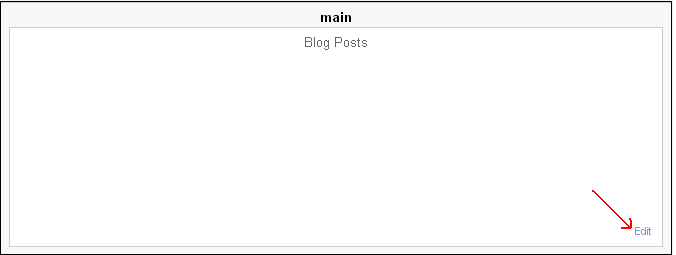
To hide or remove post date in Blogger blog posts you don’t have to edit your template files. Just login to your Blogger dashboard and head to Layout and on blog posts click edit and then uncheck the date in popup window. Also you can see various date formats to choose from and at the bottom you can arrange items. Once done click save and view your blog where you have removed post date from blog header.


How To Hide Or Remove Time In Blogger Posts ?
It is important that you show dates in you blog posts, but not time. People don’t actually benefit from time that you display in your blog posts and so remove it. To remove time in Blogger post you need to uncheck the box where you see the time in blog post layout settings.

How To Hide Or Remove Author Name In Below Blogger Posts ?
All these you can change it in your blog posts layout settings. In blog posts layout settings you can see “posted by” box uncheck it to remove author name below all blog post. You can also hide author profile below each post by un-checking the box that says “show author profile below post”.


Other Options That You Can Configure:

You can set the number of posts to be displayed in main page, show share buttons below posts, show labels below posts and moreover you can arrange all those items.

Hope this post helped you on how to hide post date, time and author name in Blogger blog posts. Share this post and feel free to leave your suggestions below.