Monday, 21 October 2013

Can You REALLY Make Money Blogging? [7 Things I Know About Making Money from Blogging]

Every now and again I am pulled aside at a conference or am emailed and/or tweeted by someone wanting to get the “real” scoop on whether it is possible to make money blogging.
  • Is it really possible to make a living from blogging?
  • Is it just a small number of people making money from blogging?
  • Is it only really possible to make money blogging if you write about the topic of making money blogging?
I completely understand the questions and would probably want to add one more:
  • If it is really possible to make money blogging, how likely is it that you’ll succeed?
I’ve written many times here on ProBlogger about this in the hope of giving a realistic picture of the topic, but I think it is worth touching on again because there is a lot of misinformation out there right now.
On one hand, we see hype on the topic. Periodically someone will claim to be able to make millions from blogging quickly. These claims are usually accompanied with the release of a product or service (i.e. they are marketing spin).
On the other hand, I periodically see people writing about how it is impossible to make money blogging (or that anyone claiming to be full time is either a scammer, a liar, or is selling something on the topic of making money online).
The reality is somewhere between these two extremes.

7 Things I know about making money from blogging

1. It is possible

I’ve been blogging for just under ten years and for nine of those I’ve been making money blogging. It started out as just a few dollars a day but in time it gradually grew to becoming the equivalent of a part-time job, then a full-time job, and more recently into a business that employs others.
I used to talk about the specific levels of my earnings when I started ProBlogger but felt increasingly uncomfortable about doing so (it felt a little voyeuristic and a little like a big-headed boasting exercise and I didn’t really see the point in continuing to do it)— but my income has continued to grow each year since I began.
On some levels I was at the right place at the right time—I got into blogging early (in 2002 … although I felt I was late to it at the time) and have been fortunate enough to have started blogs at opportune times on the topics I write about.
However I know of quite a few other bloggers who make a living from blogging, many of whom have not been blogging anywhere near as long as I have.
For some it is a hobby that keeps them in coffee; for others it is the equivalent of a part time job/supplementing other income from “real jobs” or helping their family out as they attend to other commitments (raising a family). For others it is a full-time thing.
I’ll give you some examples below.

2. There is no single way to monetize blogs

Recently at our Melbourne ProBlogger event I featured numerous Australian bloggers in our speaker lineup who fit somewhere in the part-time to full-time spectrum. They included:
The year before, we had others, including:
Most of these bloggers are full-time (or well on the way to being full-time bloggers). They come from a wide array of niches and all monetize quite differently—doing everything from selling advertising, to having membership areas, to selling ebooks, to running affiliate promotions, to promoting their offline businesses, to selling themselves as speakers, to having book deals, and so on. Many have a combination of different income streams.
They are all also Australian, and are just the tip of the iceberg in terms of what is happening here in Australia—the same thing is being replicated around the globe.
There are many ways to monetize a blog. To give you a quick sense of the many methods check out this “money map” I created a year or so back, which outlines just some that I brainstormed (click to enlarge).
Ways to Make Money Blogging.png
I also recorded this free hour-and-twenty-minute webinar giving an introduction to the topic.

3. There are no formulas

From time to time, people have released products that claim to be formulas for success when it comes to making money online. They outline steps to follow to “guarantee” you’ll make money.
In my experience there is no formula.
Each full-time blogger I’ve met in the last ten years has forged their own path and has a unique story to tell. They have often acted on hunches and made surprising discoveries along the way.
There are certainly similarities in many of the stories but each blogger has their own personality and style, each one is reaching a different audience, and each niche tends to monetize differently.
The key lesson is to be aware of what others are doing and to learn what you can from each other, but to also be willing to forge your own path as well!

4. Many niches monetize

One common critique of the topic of monetizing of blogs is that the only people making money from blogging are the ones writing about how to make money blogging.
This is simply not true.
In the above list of speakers from our Melbourne event you’ll notice I included topic/niche of each blogger. None sell products teaching others to make money blogging—all are on blogging on “normal,” every-day topics.
My own experience of having a blog about blogging (ProBlogger) and a blog about Photography is that it is my photography blog that is by far the most profitable blog (I’d estimate it’s ten times more profitable).
I’ve interviewed numerous full-time bloggers of late in a webinar series including:
Interestingly, none of them make money by teaching others to make money online. Sarah largely blogs about health and wellbeing, Tsh blogs about simple living, and Ana blogs about woodwork.

5. Most bloggers don’t make a full-time living from blogging

Every time I’ve surveyed readers of ProBlogger about their earnings, we’ve seen that those making money from blogging are in the minority.
In a recent survey of 1500 ProBlogger readers we asked about their monthly earnings. What you’re seeing below is the spread of earnings from readers who are attempting to make money blogging (note: not all ProBlogger readers attempt to make money, so not all are included in these results).
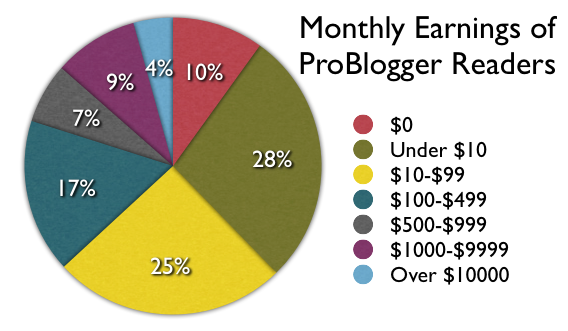
Keep in mind that ProBlogger readers are generally newish bloggers—about half of those who took this survey had been blogging for less than two years.
So of those trying to make money blogging, 10% don’t make anything and 28% are making less than 30 cents per day. A total of 63% make less than $3.50 per day.
Let’s be clear—most bloggers who are attempting to make money are not making a living from blogging.
Having said that, of the 1508 bloggers surveyed 65 (4%) are making over $10,000 per month (over six figures per year) and a further 9% were doing over $1000 per month (which is at least a part-time level of income).
My feeling, having been attending blogging conferences for six or so years now, is that the number of full-time bloggers is on the rise, and there are actually quite a few more people now at least making the equivalent of a couple of days’ work a week in income from their blogs.
However, most bloggers don’t make much.

6. It takes time to build

When I dig down into the stats from the survey on income levels above, and do some analysis of those who are in the top income bracket, it is fascinating to look at how long they’ve been blogging.
85% of those in that top income bracket have been blogging for four years or more. Almost all of the others had been blogging for three or four years.
This certainly was my own experience. I blogged for a year without making money and once I started monetizing it was around two years of gradual increases before I approached a full-time income level. It would have been four years before I joined that top bracket of income (over $10,000 per month).
Blogging for money is not a get-rich-quick thing. It takes time to build an audience, to build a brand, and to build trust and a good reputation.
And of course even with four or five years of blogging behind you, there’s no guarantee of a decent income.

7. It takes a lot of work

Longevity is not the only key to a profitable blog. The other common factor that I’ve noticed in most full-time bloggers is that they are people of action.
Passivity and blogging don’t tend to go hand in hand.
Blogging as “passive income stream” is another theme that we hear in many make-money-blogging products, however it is far from my own experience.
I’ve worked harder on my business over the last ten years than I’ve worked on anything in my life before this. It is often fun and gives me energy, but it takes considerable work to create content on a daily basis, to keep abreast of what’s going on in the community, to monitor the business side of things, to create products to sell, to build an audience, and so on.
The key is to build blogs that matter to people, that are original, interesting, and helpful. But this doesn’t just happen—it takes a lot of work.

Conclusions

Yes, it is possible to make money blogging. There is an ever-increasing number of people making money from blogging at a part-time to full-time level —however they are still in the minority.
Those who do make a living from blogging come from a wide range of niches, however one of the most common factors between them is that they’ve been at it for a long while.
How long have you been blogging? Are you looking to make money from it—and have you already? Share your experiences with us in the comments.

9 Tricks I Used To Triple My AdSense Earnings In 30 Days

I have been using Google AdSense to monetize my blogs and websites for as long as I remember. In fact it was the first method I ever tried (I made a whooping $15 on my first month… back in 2005). Over the years I migrated to other methods (e.g., direct sponsors and affiliate marketing), which made AdSense become merely an inventory filler. I was still making around $1,000 monthly from it, but whenever I could I would use other methods over it.
Then some months ago I started noticing an upward trend on the CPC of my sites, and I figured that I should give AdSense another try. I started applying some tricks here and there, and the next month I made over $3,000 with it (that is combining all my sites). I was pleasantly surprised, and I decided to keep using it actively on some sites.
In this article I want to share with you the tips and tricks I used to triple my AdSense earnings in one month.

1. I added units to my Big Websites

Daily Blog Tips and Daily Writing Tips are my largest websites in terms of traffic. They are getting close to one million monthly page views (combined). Despite that I was not using AdSense on them, mainly because the direct sponsorship model was working relatively well.
Some months ago I decided to load some AdSense units on the sites, however, and the results were very positive. Around 70% of the boost I generated to my earnings came from these two sites. At the same time I managed to keep the other monetization methods working fine, and no reader ever complained about the new ads (more on that later).
Even if your blog is already making money with direct sponsors and affiliate marketing, therefore, you could still manage to increment your earnings by strategically adding some AdSense units.

2. I added units to my Small Websites

As many webmasters do, I have a bunch of small websites scattered around the web. Some are on free hosted platforms like Blogger, and others are self hosted sites that I abandoned along the way. Most of these sites still get traffic, however. Not much, but combined the numbers get decent.
I figured that adding AdSense units to all these sites could yield some money, and I was right. The main reason is that, since these are abandoned sites and don’t have loyal visitors, I can place the units very aggressively. The result was a very high CTR (Click-through rate), which compensates the small traffic levels.
Don’t underestimate the earning potential of small websites, especially if you are willing to place AdSense units aggressively.

3. I used the Large Units

If you want to make money with AdSense you’ll inevitably need to use one of these units: the 336×280 large rectangle, the 300×250 rectangle, the 120×600 large skyscraper or the 728×90 leaderboard.
Whenever I tried to use smaller units the results were disappointing. Even if I positioned them aggressively the CTR was just too low.
All four units mentioned above can produce good results, but the best performing one is by far the 336×280 large rectangle, and that is the one I used to boost my earnings.

4. I placed the Units above the Fold

My first trial was to place the 336×280 large rectangle between the post and the comments section of my blogs. The results were OK. I then decided to try placing them below the post titles for one week, and the CTR skyrocketed. In fact I still need to find a placement/unit combination that will beat placing a 336×280 unit below post titles.
I knew this rule, but I guess I needed to test and get confirmation. The rule is: if you want to make money with Google AdSense, you must place your units above the fold.

5. I Focused on Organic Traffic

My main concern with adding a large AdSense unit right below my post titles was that some of the loyal readers could get annoyed with it. At the same time I knew that loyal readers become ad blind quite fast, and that the bulk of my money would come from organic visitors (i.e., people coming via search engines to my posts).
To solve this problem I decided to display the large rectangle only on posts older than seven days (using the Why Do Work WordPress plugin). It worked like a charm, as loyal readers don’t even notice the ad units when they are browsing through my recent posts, and organic visitors almost always see the ads because they usually land on posts older than seven days.

6. I started using AdSense for Search

I was not sure how much money I would be able to make with AdSense for Search, but I was not happy with the search results provided by WordPress, so I decided to give it a shot anyway.
Currently I am making around $60 monthly with AdSense for Search. It is not much, but if you sum it over one year we are talking about $720. On top of that the search results are as relevant as you’ll get, so it is a win win situation.

7. I started using AdSense for Feeds

Another AdSense product I decided to try was the AdSense for Feeds one. I opted to display the ads below my feed items (you can also place them on top, but this would be too intrusive in my opinion). The results here were pretty good, both in terms of CTR and earnings.
You obviously need a large RSS subscriber base to make this work, but I am guessing that even with a couple thousand subscribers you could already make $100 monthly from feed ads.

8. I played around with section targeting

Section targeting is an AdSense feature that allows you to suggest specific sections of your site that should be used when matching ads. You can read more about it here.
I found that on niche and small websites section targeting can help a lot. Often times Google was displaying unrelated ads on these sites because there weren’t enough pages. After using section targeting I managed to increase the relevancy of the ads and consequently the CTRs.

9. I tested with Different Colors and Fonts

If you enabled both image and text ads on your units you should be able to customize the colors and fonts. I did some testing with both of these factors, and it helped to increase the numbers. Nothing dramatic, but it was definitely worth my time.
You just need to track your CTR for a couple of weeks. Then change the color or font and track it for another week, seeing if you can beat the original CTR. If you can, keep the new format. If you the performance decreased, try a new color or font and track the CTR for another week, until you find the optimal combination.

Google AdSense Alternatives

According to popular marketing analysis from the beginning of 2010, one from every two online ads comes from Google Adsense. This shows how powerful Google Adsense is but also that there are still other alternatives. There are reasons to choose an alternative to the almighty Google service either when you are a publisher or advertiser. Such reasons include:
  • Higher revenue for publishers / Lower costs for advertisers
It is common for larger sites to manage their own advertisement campaigns, find advertisers / publishers directly and negotiate better deals. Naturally, with such larger sites Google Adsense has the least ads market share. An alternative for higher revenues are the so called affiliate programs which is suitable even for less popular sites as long as they are strictly specialized in one area. In this case it is feasible to find relevant subscriptions in which your visitors might be interested in and get a share of the subscription fees. We should mention here the popular service from the leader on the affiliate marketing - Commission Junction (CJ). It manages a huge number of affiliate programs for third parties. With CJ publishers have unmatched choice to find the best offers which may interest their visitors. Naturally, publishers' revenues rely on real sales generated from their site and not on impressions and clicks. A great feature is that publishers have the option to choose the advertisers, their offers and even the exact banners which will show on their sites. They also know what revenue (share in %) to expect per sale. These are very profitable features which Google Adsense lacks but it is not for every publisher. It requires marketing skills and knowledge about what visitors might be interested in purchasing. CJ has also great benefits for advertisers. First, it manages entirely their affiliate programs which is not an easy task. Second, the number of attracted publishers depends on the competitiveness of the ads. That's why if you are a publisher and believe your offers are competitive this is definitely the choice for you.
  • Noncompliance with Google Adsense policies - important for both publishers and advertisers
This point should not be underestimated because Google has very strict policies which exclude publishers / advertisers with sites with violent and/or illegal contеnt, gambling, sales of alcohol, tobacco-related products, and last but not least adult content. For more information please check this link. Once web site owners find their sites are not complying with Google Adsense policies they have the option to use similar pay-per-click and pay-per-view alternatives such as:   Adbrite - while they lack some of Google ads restrictions they also have some unique features such as full page ads, BritePic (show sads over your pictures) and others.   Clicksor - much less restrictive policies which are suitable even for adult sites. In conclusion, we believe that Google will remain the leading online ads provider in future because of its competitive advantages. Though if you are not satisfied with its effectiveness or you can't comply with its policies there are very good alternatives.

Google AdSense Tips and Tricks

The Google AdSense solution is used by millions of web masters around the world. Some of them have great success and good income, while others get only a few dollars.
Here we will share some basic tips which are known to help increase the revenue generated through Google AdSense.
First, you should choose the advertisement block format which best suits your web site visual style. The experience shows that the 336x280 Large Rectangle, the 300x250 Medium Rectangle, and the 160x600 Wide Skyscraper are the most effective shapes. Still, you should mind the visual appearance of your web pages when you insert the AdSense code. If you have a little space for ads, the best solution will be the link unit format.
Additionally, you should pick the most suitable color palette for your ads block. If you have a light background on your web site, it is better to use a similar light palette for the AdSense box. The contrast choice for an ads box palette is good only for web sites with dark background. Still, it is better to pick a color which already exists in your web site.
It is better to create an ads unit which includes both text and images. In this way both will be displayed and this will increase the chance to get a click on an advertisement by a web site visitor.
Next, you should consider the location of the ads on your web pages.
Probably the best position of the advertisements is in the top / header of your site. However, this can break the consistency of your content, so you should be careful using such a solution. Other good locations are just below the navigation bar, above the footer and in the left menu area. You should always put yourself in the visitors' shoes and look to the web site from their point of view. If the ads block makes you feel uncomfortable while browsing the web site, you should consider a different position or formatting.
Additionally, you should define the number of the advertisement units per page. There are some restrictions about it. You are allowed to have up to three advertisement units per page (in addition to three link units and three referral units). If you have a web site with a lot of content, which requires the visitors to scroll down the pages or you manage a forum or a blog, it is wise to put more AdSense blocks. However, always make sure that the main unit which will generate the major part of the revenue is loaded first in the web site source code. In case you wonder, if you place more than 3 ads units on a page only the first 3 will appear.
Detailed instructions on how to improve the efficiency of your AdSense blocks can be found in the Google AdSense resources section:

Google AdSense Integration

In order to start using Google AdSense you need to create an account first. This can be done at:
Click on the Sign Up button to proceed. Fill in all required details and be sure to read the Google AdSense policy before completing the sign-up procedure.
Once the sign-up procedure is completed, you will get a welcome e-mail with instructions on how to use the Google AdSense tool.
Log in the Google AdSense panel and using the included wizard generate the Google AdSense code according to your preferences.
It will be similar to the following one:
<script type="text/javascript">
<!-- google_ad_client = "pub-UNIQUE_NUMBER";
/* 300x250, created 29/03/10 */
google_ad_slot = "11111111";
google_ad_width = 300;
google_ad_height = 250;
//-->
</script>
<script type="text/javascript" src="http://pagead2.googlesyndication.
com/pagead/show_ads.js">
</script>
Instead of the "UNIQUE_NUMBER" string you will see a number which is generated by Google and is unique for your account.
In the Google AdSense panel you can check the reports regarding the Google AdSense activity on your web sites. Also, from there you can generate code for advertisement blocks with different shapes and formatting and tune your AdSense setup.
Once you have the Google AdSense unit code you should include it in your web site.
If you have an HTML web site, you can include it directly in the source code.
If you wonder which is the best position for your Google Adsense advertisements, you can check this article:
Basically, the way to include the code depends on your web site technology and personal preferences.
Most of the popular php scripts come with additional extensions which allow you to insert the Google AdSense code without editing your files.
Here we will show different ways to include the code in open-source PHP projects.
We will start with Joomla 1.5, which is probably the most popular open source CMS.
You can find comprehensive instructions on how to install and use the software in our tutorial:
There are many different approaches for integrating the Google AdSense code. We recommend that you use a Joomla extension for this purpose.
Using such an extension allows even people who know nothing about programming to enable Google AdSense for their accounts.
You can choose the preferred extension from the following resource:
Then you must follow our Joomla 1.5 tutorial in order to complete the extension installation:
Some extensions allow IP blocking. This way you can block yours and prevent a violation of the Google AdSense Terms of Use while performing tests.
Another widespread open-source script is WordPress. This application is one of the most popular free blogging solutions.
You can find detailed information on how to install and use it at:
Since inserting the Google AdSense code directly in the WordPress theme's source code requires some programming knowledge, we will use a Google AdSense plugin.
You can choose the one which best covers your needs at:
Detailed instructions on how to install plugins can be found in our WordPress tutorial:
Also, every plugin has an Installation tab and the specific installation instructions are published there.
Once you install and activate the plugin, you should enter the specific code generated through the Google AdSense wizard.
Most of the other scripts have similar solutions for adding the Google AdSense code. You can either use an external extension or you can insert it directly in the source code of your web site.