Sunday, 29 April 2018

[WARHOX] HOW TO CRACK VMWARE 14 PRO WARKING 10,000%


DISCLAIMER: This Channel DOES NOT Promote or encourage Any illegal activities , all contents provided by This Channel is meant for EDUCATIONAL PURPOSE only .

Copyright Disclaimer Under Section 107 of the Copyright Act 1976, allowance is made for "fair use" for purposes such as criticism, comment, news reporting, teaching, scholarship, and research. Fair use is a use permitted by copyright statute that might otherwise be infringing. Non-profit, educational or personal use tips the balance in favor of fair use.

________________________________
Serial:
ZF19K-02Z8H-H89ZQ-UFWZE-WQKU0
VA552-68W90-489UY-T7MEX-M3AV2
VZ302-43YEP-M8DWQ-VWZEC-YKH8D
CA3DK-62W9P-08D7Z-5EXZG-XY8CF
VF3N0-AHX8P-H8EYY-G6WNC-X7KW0

_________________________________________________________________


Saturday, 28 April 2018

Finding Packages for Kali Linux

Finding Packages for Kali Linux
Use apt-cache
   Of the various interfaces available to search for packages, apt-cache is the most basic and rudimentary of them all.

   However, it is also the interface we tend to use most often because it is fast, easy, and efficient. By default, apt-cache searches for a given term in package names as well as their descriptions.
   
   Use this command: apt-cache search PACKAGES NAME

   For example, knowing that all Kali Linux metapackages include ‘aircrack-ng’ in their names, we can easily search for all of them.
   Enter this command: apt-cache search aircrack-ng

   In many cases, apt-cache returns far too many results because it searches in package descriptions. The searches can be limited to the package names themselves by using the –names-only option.

root@kali:~# apt-cache search nmap | wc -l
37
root@kali:~# apt-cache search nmap --names-only
dnmap - Distributed nmap framework
fruitywifi-module-nmap - nmap module for fruitywifi
nmap-dbgsym - debug symbols for nmap
python-libnmap - Python 2 NMAP library
python-libnmap-doc - Python NMAP Library (common documentation)
python3-libnmap - Python 3 NMAP library
libnmap-parser-perl - parse nmap scan results with perl
nmap - The Network Mapper
nmap-common - Architecture independent files for nmap
zenmap - The Network Mapper Front End
nmapsi4 - graphical interface to nmap, the network scanner
python-nmap - Python interface to the Nmap port scanner
python3-nmap - Python3 interface to the Nmap port scanner

   Since apt-cache has such wonderfully greppable output, we can keep filtering results until they’re at a manageable number.

root@kali:~# apt-cache search nmap --names-only | egrep -v '(python|perl)'
dnmap - Distributed nmap framework
fruitywifi-module-nmap - nmap module for fruitywifi
nmap - The Network Mapper
nmap-common - Architecture independent files for nmap
nmap-dbgsym - debug symbols for nmap
nmapsi4 - graphical interface to nmap, the network scanner
zenmap - The Network Mapper Front End

   You can further filter down the search results but once you start chaining together a few commands, that’s generally a good indication that it’s time to reach for a different tool.

Use aptitude
   The aptitude application is a very close cousin of apt and apt-get except it also includes a very useful ncurses interface. It is not included in Kali by default but it can quickly be installed as follows.
   root@kali:~# apt update && apt -y install aptitude

   After installation, running aptitude without any options will launch the ncurses interface. One of the first things you will notice is that you can quickly and easily browse through packages by category, which greatly helps with sorting through the thousands of available packages.

   To search for a package, either press the / character or select ‘Find’ under the ‘Search’ menu. As you enter your query, the package results will be updated dynamically

   Once you’ve located a package of interest, you can mark it for installation with the + character or to remove/deselect it, the character.

   At this point, you can keep searching for other packages to mark for installation or removal. When you’re ready to install, press the g key to view the summary of the actions to be taken.

   If you’re satisfied with the proposed changes, press g again and aptitude will complete the package installations as usual.

Use search engines
   If you want to restrict your searches to tools that are packaged by the Kali team, the easiest way to do so is probably by using the search engines site (Google, Bing or DuckDuckGo) search operator.

   Using this keyword: site:kali.org PACKAGES NAME

   Example: site:kali.org lynis

Read more
 * What is Kali Linux Metapackages and How to install it?: http://bit.ly/2IGVcub
 * DEBIAN PACKAGE MANAGEMENT

How to check Spectre and Meltdown on Ubuntu/Debian ?

Debian/Linux with Spectre and Meltdown vulnerability
Using Terminal
   To check Spectre and Meltdown vulnerability by Terminal, enter that command. You will see information about security vulnerabilities on the CPU from Linux kernel developers:
      grep . /sys/devices/system/cpu/vulnerabilities/*

Using Spectre & Meltdown checker for Linux
   If you would like to know more about the Specter and Meltdown vulnerabilities, you can use the "Specter and Meltdown checker for Linux"

   First, enter the that command to download "Specter and Meltdown checker for Linux":
      git clone https://github.com/speed47/spectre-meltdown-checker
      cd spectre-meltdown-checker

   Next, to check and see details about the Specter and Meltdown vulnerabilities on your CPU, enter this command:
      sudo ./spectre-meltdown-checker.sh

   You will find detailed information about security vulnerabilities Meltdown, Specter Specter v1 and v2 on your CPU. And whether your computer is vulnerable to attacks via Specter and Meltdown vulnerabilities

How to patch vulnerabilities Specter and Meltdown ?
   Developers will release patches through the packages, so update your Linux distribution regularly

Read more: 
 * Spectre & Meltdown checker for Linux
 * Meltdown and Spectre - Two serious Security Holes in the CPU severely

Ransomnix ransomware variant encrypts websites


Ransomnix is a (supposedly Jigsaw, but not really) ransomware variant that holds websites for ransom, and encrypts any files associated with the website.

This ransomware was discovered in the second half of 2018, and there's a brief write-up by Amigo-A here as well: Ransomnix ransomware

In this blog post, we'll discuss a newer variant.


Analysis

Several encrypted websites were discovered, which display the following message:

Figure 1 - Ransom message, part 1

Figure 2 - Ransom message, part 2

The full message is as follows:


JIGSAW RANSOMNIX 2018
I WANT TO PLAY A GAME!
Now Pay 0.2 BTC
OR
Payment will increase by
0.1
BTC each day after
00:00:00
Your Key Will Be Deleted
Your Bill till now 2.4000000000000004 BTC
Dear manager, on
Fri Apr 06 2018 02:08:34 GMT+0100 (GMT Summer Time)
your database server has been locked, your databases files are encrypted
and you have unfortunately "lost" all your data, Encryption was produced using
unique public key RSA-2048 generated for this server.
To decrypt files you need to obtain the private key.
All encrypted files ends with .Crypt
Your reference number: 4027
To obtain the program for this server, which will decrypt all files,
you need to pay 0.2 bitcoin on our bitcoin address 1VirusnmipsYSA5jMv8NKstL8FkVjNB9o (today 1 bitcoin was around 15000 $).
After payment send us your number on our mail crypter@cyberservices.com and we will send you decryption tool (you need only run it and all files will be decrypted during a few hours depending on your content size).
Before payment you can send us one small file (100..500 kilobytes) and we will decrypt it!
It's your guarantee that we have decryption tool. (use your reference number as a subject to your message)
We don't know who are you, All what we need is some money.
Don't panic if we don't answer you during 24 hours. It means that we didn't received your letter and write us again.
You can use one of that bitcoin exchangers for transfering bitcoin.
https://localbitcoins.com
https://www.kraken.com
You dont need install bitcoin programs - you need only use one of this exchangers or other exchanger that you can find in www.google.com for your country.
Please use english language in your letters. If you don't speak english then use https://translate.google.com to translate your letter on english language.
You do not have enough time to think each day payment will increase by
0.1 BTC and after one week your privite key will be deleted and your files will be locked for ever.

People use cryptocurrency for bad choices,
 but today you will have to use it to pay for your files!
 It's your choice!

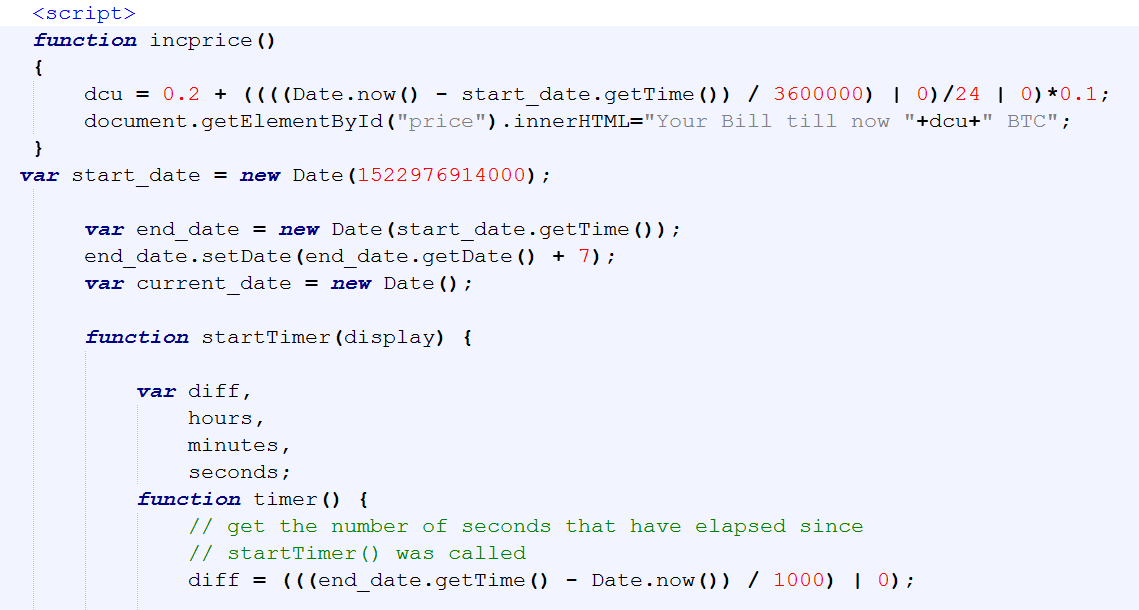
The following JavaScript is responsible for keeping track of the price, and increasing it:

Figure 3 - JS function

The starting price is set at 0.2 BTC, but will increase every day with 0.1 BTC thanks to two functions: inprice and startTimer.
The function for calculating the time and date, startTimer, is a copy/paste from the following StackOverflow answer: The simplest possible JavaScript countdown timer?

Note that the start_date variable, 1522976914000, is the epoch timestamp in milliseconds, which converted is indeed Friday 6 April 2018 01:08:34, as mentioned in the ransom note.

Ransomware message details:

BTC Wallet: 1VirusnmipsYSA5jMv8NKstL8FkVjNB9o
Email: crypter@cyberservices.com 
Extension: .Crypt

Files will be encrypted, as claimed by the cybercriminals, with RSA-2048.

Unfortunately, it appears several people have already paid for decryption: 1VirusnmipsYSA5jMv8NKstL8FkVjNB9o


Disinfection

If possible, restore the website from a backup, and consequently patch your website, this means: install all relevant and security patches for your CMS, and plugins where applicable.

Then, change all your passwords. Better be safe than sorry.

It is currently unknown if decryption is possible. If you have an example of an encrypted file, please do upload it to ID Ransomware and NoMoreRansom, to see if decryption is possible, or if a decryptor can be developed.


Prevention

For preventing ransomware that attacks your websites, you can follow my prevention tips here.

General ransomware prevention tips can be found here.


Conclusion

Ransomware can in theory be installed on everything; whether it's your machine, your website, or your IoT device. Follow the prevention tips above to stay safe.

Remember: create backups, regularly, and test them as well.


IOCs

[WARHOX] PHISHING INSTAGRAM HACKED WITH 1000% PROF💣


DISCLAIMER: This Channel DOES NOT Promote or encourage Any illegal activities , all contents provided by This Channel is meant for EDUCATIONAL PURPOSE only .

Copyright Disclaimer Under Section 107 of the Copyright Act 1976, allowance is made for "fair use" for purposes such as criticism, comment, news reporting, teaching, scholarship, and research. Fair use is a use permitted by copyright statute that might otherwise be infringing. Non-profit, educational or personal use tips the balance in favor of fair use.

-------------------------------------------------------------------------------------------------
_________________________________________________________________

codes to use on one click .bat file

_________________________________________________________________


1.
open notepad / any text editer software


2.
type this code

_________________________________________________________________

@echo off

start firefox "https://temp-mail.org/en/" "http://shadowave.co/?do=victims" "https://web.whatsapp.com/"

_________________________________________________________________

3.
save as ".bat" file

4.
and click on it...........


U can watch the full video